
The Tidaro mobile app is available for Android and iOS. With it you can book desks, rooms and parking spots from your phone and get notified when something important happens with your bookings.
This article shows you how to download the app, sign in for the first time and why it's worth allowing notifications.
Good to know: you need an activated Tidaro user account to sign in. If you don't have one yet, see the article How to get started with Tidaro.
In short
- Download the Tidaro app from Google Play or the App Store.
- Open the app, enter your business email address and tap Continue.
- Enter your password and tap Sign in. If your company uses SSO, sign in with your company account.
- When the app asks about notifications, tap Allow, so you don't miss invitations, reminders and changes to your bookings.
How to download the app
How to sign in to the app
- Open the Tidaro app.
- Enter your business email address and tap Continue.
- Enter your Tidaro password and tap Sign in.
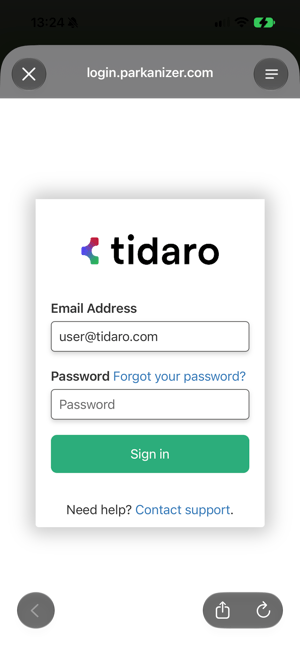
If your company uses single sign-on (SSO), you sign in with your company account instead of a Tidaro password.
Don't remember your password? Tap Forgot your password? and follow the instructions in the email. If you still can't sign in, tap Contact support.
Why allow notifications
After you sign in, the app asks whether it can send you notifications. We recommend tapping Allow. Notifications tell you about things that need your attention, often when you have only a short time to react:
- Office invitations: a colleague invites you to the office and has booked a desk for you.
- Reminders about tomorrow's booking: on the day before, you get a reminder, so you can release the place if your plans have changed.
- A place from the waiting list: you find out right away that a place you were waiting for is now yours.
- Check-in reminders: the app reminds you to confirm your arrival, so you don't lose your booking.
- Automatic release: you're told when your booking has been released automatically, for example because you didn't check in.
- Changes made by an administrator: you know right away when an administrator assigns, changes or releases your desk or parking spot.
Without notifications you'd have to check the app yourself to see these changes. Which notifications you get depends on the features your company uses.
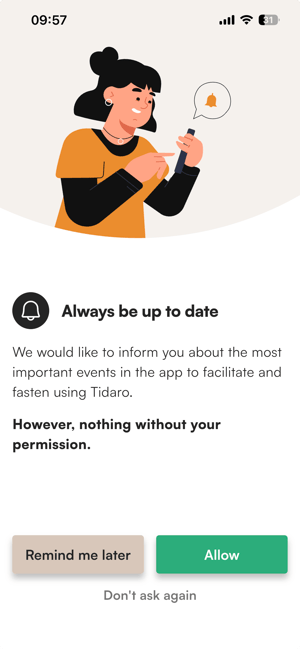
On this screen you can choose:
- Allow: your phone then asks you to confirm. Allow notifications there too.
- Remind me later: the app asks you again another time.
- Don't ask again: the app won't ask again. You can still turn notifications on later in your phone's settings.