
If another car is blocking your car in the parking lot, you can report it in the Tidaro app. The app helps you find out who the blocking car belongs to.
Good to know: this feature might work differently from company to company, depending on its internal legal privacy policies.
In short
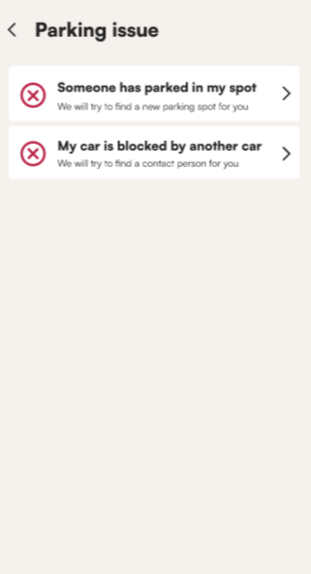
- On the home screen, click I have a parking issue and select My car is blocked by another car.
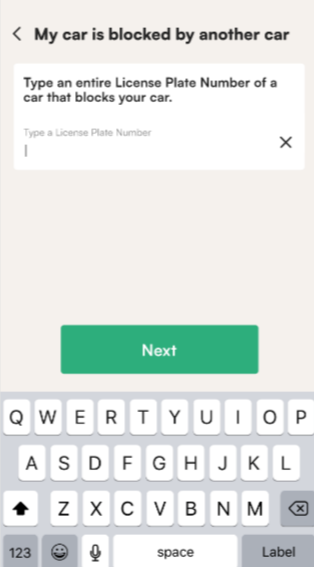
- Type the license plate of the car that is blocking yours.
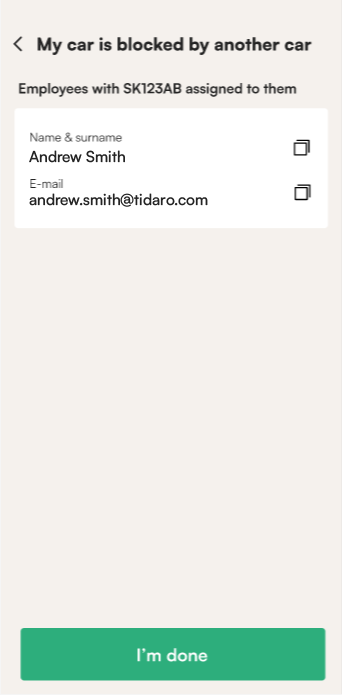
- The app shows who the car belongs to, or tells you that the license plate is not registered in Tidaro.
- In either case, you can contact the parking administrator to solve the problem.
How to report that your car is blocked
- Open the Tidaro app.
- On the home screen, click I have a parking issue.
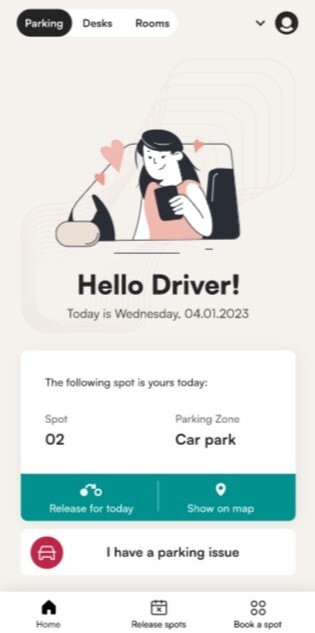
- Select My car is blocked by another car.
- Type the entire license plate of the car that is blocking your car.
- Click Next.
What will I see after I enter the plate?
The app shows you one of two things:
- who the blocking car belongs to,
- a message that the license plate is not registered in Tidaro.
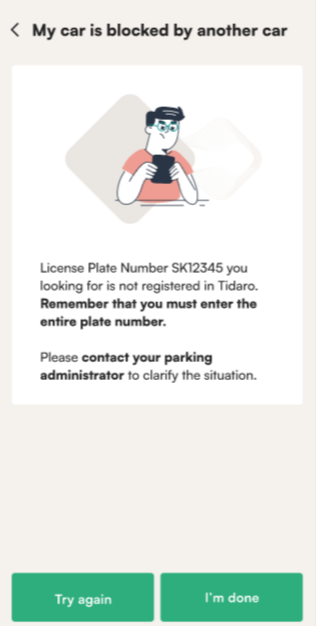
What can I do if the plate is not registered?
- Check the license plate for typos. If there was one, type the plate again.
- If the plate is correct, contact the parking administrator to solve the problem.