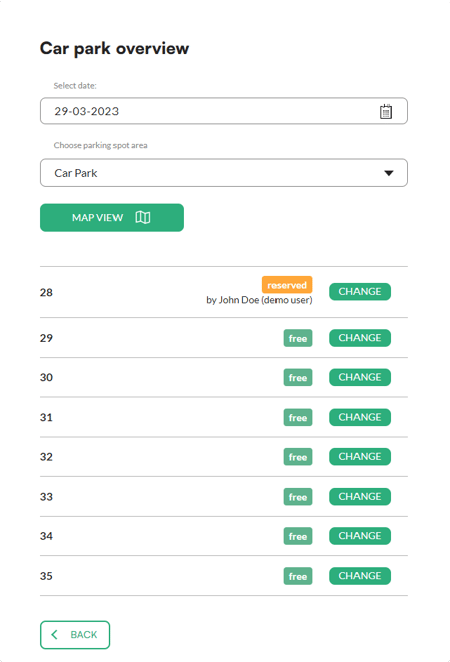
The daily view is your everyday overview of the car park. It shows all parking spots in a chosen area on a given day and who booked them. This is where you react to day-to-day situations, for example by giving someone a different spot for today.
Changes in the daily view apply only to the selected day.
Good to know: If you want to permanently change how a spot works (for example, assign it to an employee or make it unavailable for booking), do it in the area settings: Spots > Areas. The article "Parking area settings" describes how.
In short
- You'll find the daily view in Spots > Daily view.
- Choose a date and an area to see the list of spots and their bookings.
- The Map view button shows the spots on the car park map.
- The Change button next to a spot lets you change it for the selected day only.
- Permanent changes are made in Spots > Areas.
How to open the daily view
- In the left menu, under Manage, unfold Spots.
- Click Daily view.
- Choose the date and the area you want to view. The app shows a list of all spots in the area.
Map view
Click Map view to see the spots on the car park map. You can zoom the map with your mouse scroll wheel. When you click a spot on the map, you see its number and status, and you can change it for the selected day with Change.
How to change a spot for the selected day
- Click Change next to the spot in the list, or select the spot on the map and click Change.
- Choose what you want to do.
- Click Confirm.