
Booking reminders remind you about your upcoming parking spot bookings. If you have a parking spot booked for the next day, Tidaro sends you a reminder on your phone. Tap it to see the booking details and cancel the booking if you no longer need the spot.
Good to know: this feature is only available if your company (for example, your office manager or admin) has turned it on with Tidaro's help.
In short
- Reminders are sent in the afternoon of the day before your booking.
- If you don't need the spot, tap Release for tomorrow.
Note: When you log in to the Tidaro mobile app, please make sure to allow notifications.
How the reminders appear
If the app is closed or running in the background, the reminder appears in your phone's Notification Center.

If the app is open, the reminder does not appear in the Notification Center. Instead, the app automatically opens the upcoming bookings screen.
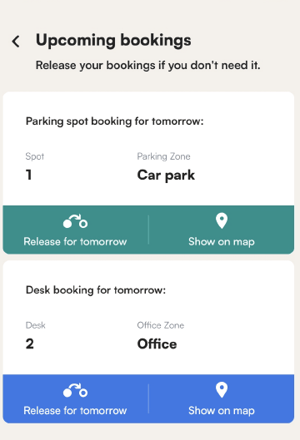
How to cancel a booking from a reminder
- Tap the reminder, or open the app to see the upcoming bookings screen.
- Check your booking details.
- If you no longer need the spot, tap Release for tomorrow.